
Download BitCalc Lite – video encoding calculator, bitrate calculator, file size calculator, video duration calculator, free video tool, Android app, video production tool, encoding settings, video project planning, video compression tool
Overview
BitCalc Lite is a lightweight Android application designed to simplify the technical aspects of video encoding projects. Developed by Matt Hawkins, the app serves as a dedicated tool for calculating key parameters such as duration, file size, and bitrate. It is particularly useful for users involved in video production, content creation, or digital media management who need to plan encoding settings with precision. By requiring only two of the three parameters—duration, file size, and bitrate—the app automatically computes the third, enabling faster and more accurate project planning.
The application is tailored for both hobbyists and professionals working with video files across various platforms. Whether preparing a video for upload to a streaming service, optimizing storage usage, or setting encoding presets, BitCalc Lite streamlines the decision-making process. Its core functionality supports real-world scenarios such as determining the maximum file size allowed by a platform, estimating how long a video will be at a given bitrate, or calculating the required bitrate to meet a target file size. The app does not handle actual video encoding but provides essential pre-encoding calculations to guide users in their workflow.
Key Features & Capabilities
- Three-way calculation engine – Users can input any two of the three parameters: duration, file size, and total bitrate. The app computes the third instantly, supporting flexible project planning.
- Unit customization – Options to switch between seconds, minutes, and hours for duration; kilobytes, megabytes, and gigabytes for file size; and kilobits, megabits, and gigabits per second for bitrate.
- Total bitrate estimation – Calculates the combined bitrate of audio and video streams, allowing users to allocate bandwidth between components based on project needs.
- Encoding setting guidance – Helps users determine appropriate values for encoding software by providing accurate theoretical file sizes and durations.
- Free and lightweight – The app is available at no cost and has a minimal footprint of 1.2 MB, making it suitable for devices with limited storage.
For example, a content creator preparing a 10-minute video for a platform with a 500 MB limit can use BitCalc Lite to determine the maximum allowable bitrate. Similarly, a video editor planning a 2-hour project with a 4 GB file size target can calculate the required average bitrate. The app’s intuitive interface ensures these calculations are accessible without technical expertise.
User Interface, Workflow & Performance
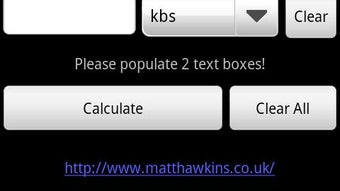
BitCalc Lite features a clean, minimal interface focused on core functionality. The layout centers around input fields for duration, file size, and bitrate, with clear labels and unit selectors. Navigation is straightforward, allowing users to select values and switch units with a few taps. The app responds instantly to input changes, delivering calculated results without noticeable delays.
Workflow efficiency is high, as users can perform multiple calculations in sequence without restarting the app. The interface is optimized for touch input, making it usable on smartphones and tablets. The developer did not specify resource usage details, but the small file size and focused functionality suggest low CPU and memory consumption. Stability appears consistent based on general behavior of lightweight Android utilities. Performance observations are based on general software behavior patterns.
Compatibility & System Requirements
BitCalc Lite is designed for Android devices and is compatible with the Android operating system. The app has a file size of 1.2 MB, indicating minimal storage requirements. The developer did not provide additional system requirements, so specific hardware or OS version details are not available. Compatibility information was partially provided.
Users should ensure their device meets the baseline Android requirements for app installation. While no minimum Android version is listed, the app’s lightweight nature suggests it may run on older devices. However, exact compatibility with specific Android versions or hardware configurations is not specified.
Pros and Cons
Pros
- Free to download and use with no in-app purchases
- Lightweight at only 1.2 MB
- Supports flexible unit selection for duration, size, and bitrate
- Quick and accurate calculations for encoding planning
- Simple, intuitive interface suitable for non-technical users
Cons
- No support for custom audio or video bitrate separation
- Does not account for container overhead or metadata in final file size
- Unit conversion is limited to standard values without advanced options
- Exact system requirements not provided by the developer
- Only available on Android, with no support for iOS or desktop platforms
FAQ Section
Is BitCalc Lite available for iOS devices?
Currently, BitCalc Lite is only available for Android. There is no official version for iOS or other operating systems.
Can I use BitCalc Lite offline?
Yes, the app does not require an internet connection to perform calculations. All functionality is available offline.
Is BitCalc Lite secure to download?
As a free Android app developed by Matt Hawkins, BitCalc Lite is distributed through official channels. It does not collect personal data or require permissions beyond basic functionality.
How often does BitCalc Lite receive updates?
The developer has not provided information about update frequency. Users should check the app store for the latest version.
What type of license does BitCalc Lite use?
BitCalc Lite is distributed as free software with no licensing restrictions. It is intended for personal and professional use without cost.
Final Thoughts
BitCalc Lite delivers a focused, reliable solution for video encoding planning on Android. Its ability to quickly calculate duration, file size, and bitrate with customizable units makes it a valuable tool for content creators and video professionals. While it lacks advanced features like audio/video bitrate separation or container overhead adjustments, its simplicity and accuracy meet the core needs of many users. The app’s minimal size and offline functionality enhance its practicality.
For anyone involved in video production who needs to plan encoding settings efficiently, BitCalc Lite is a smart choice. It eliminates guesswork and supports precise project planning without unnecessary complexity. Download BitCalc Lite now.






.png)
